
Snappy Kraken uses multiple layers of spam protection:
- Built-in (automatic) spam prevention: Our platform has back-end security measures that block a large portion of automated spam before it ever becomes a lead.
- Spam Filtering (you control): You can add your own stop words and blocked email domains to further reduce unwanted form submissions.
Block words or phrases (Stop Words)
Use Stop Words when spam submissions include repeated text (for example: “SEO services”, “guest post”, “crypto”, etc.).
- In the left sidebar, go to Site Settings.
- Select Spam Filtering.
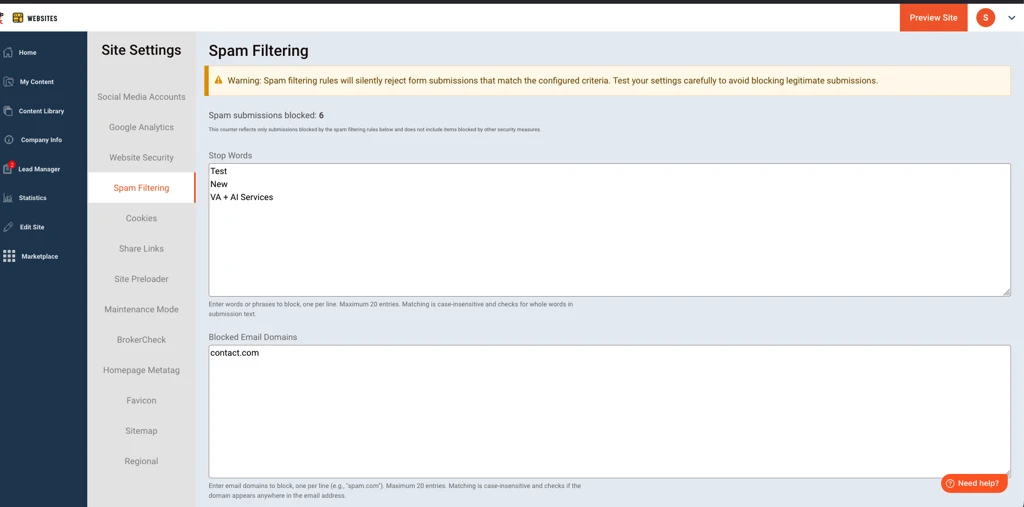
- Under Stop Words, add words or phrases you want to block (one entry per line).
- Click Save.
Tip: Use specific phrases instead of short/common words (for example, blocking New could accidentally block legitimate inquiries).
Block email domains (Blocked Email Domains)
Use Blocked Email Domains when spam is consistently coming from the same domain(s).
- In the left sidebar, go to Site Settings.
- Select Spam Filtering.
- Under Blocked Email Domains, enter domains you want to block (one entry per line).
- Enter the domain only (for example:
example.com) - Do not include the
@symbol
- Enter the domain only (for example:
- Click Save.
What happens when a submission is blocked?
When someone submits a form, we check the submission against your Spam Filtering rules before processing it:
- If a stop word appears anywhere in the submission text, the submission is rejected.
- If the submitter’s email contains a blocked email domain, the submission is rejected.
- If no rules are matched, the submission is processed and delivered normally.
What the submitter sees: Rejected submissions are handled silently. The submitter will still see a success confirmation message, but the submission will not be saved or delivered.
Important to know
Matching is case-insensitive for both stop words and blocked email domains.
Domain matching looks for the entered value anywhere in the email address.
Example: blocking
example.comwill also blockmail.example.com.Avoid short or common stop words (for example:
New) since they can unintentionally block legitimate submissions.
Limits and restrictions
- Stop Words: maximum of 20 entries
- Blocked Email Domains: maximum of 20 entries
- Spam submissions blocked is cumulative and does not reset.
- Domain filtering only checks the email field on the form (it won’t scan other fields for domain patterns).
If you’re still getting spam
Some unwanted messages may come from real people (for example, solicitation messages), and blocking all of those without also blocking legitimate leads isn’t always possible.
If you’re seeing persistent spam patterns, send Support examples of a few recent submissions so we can review trends and continue improving our back-end filtering.